


Lung-protective ventilator settings in seconds. Not in your head.
Rapid Vent Calculator turns sex, height, and weight into lung-protective vent settings and weight-based RSI medication doses while you're still at the head of the bed. The full ventilator calculator is 100% free on iPhone and Android.


5.0
App Store rating
Free forever
No account, no subscription
Seconds
From patient to lung-safe settings
Built for EMS·Flight & Transport·Emergency Departments·ICU·Respiratory Therapy

The 2 a.m. problem
Manual ventilator calculations fail at the worst possible time
The tube is confirmed. The vent comes out of the bag. Now you need ideal body weight from a height you're estimating, times a mL/kg target you memorized years ago, into a rate that clears CO2, while the monitor alarms and your partner is asking for numbers.
Formula recall under stress
IBW is 50 plus 2.3 per inch over five feet, 45.5 for females. Easy at a desk. A different job mid-call with gloves on and radio traffic in your ear.
The actual-weight trap
Lung size follows height, not weight. Set tidal volume off the scale weight and a 250-pound patient gets far more volume than their lungs can safely take. It is the classic vent settings error.
Guessing isn't an option
A guessed tidal volume overstretches alveoli: volutrauma, barotrauma, ventilator-induced lung injury. In the ARDS Network ARMA trial, 12 mL/kg tidal volumes meant 39.8% mortality against 31.0% at 6 mL/kg of predicted body weight (ARDS Network, NEJM 2000).
You don't need a better memory. You need the math done for you, the same way, every time.
See the difference
Hand math vs. a ventilator calculator
A 5'10" male just got intubated. Watch the hand math try to keep up.
By hand
Every line is another chance to slip a decimal. The patient is waiting on all of them.
With Rapid Vent Calculator
0:03
IBW, Vt, RR, minute ventilation, and RSI doses. Done.
The fix
Lung-protective vent settings in three taps
No menus to dig through, no formulas to recall. Enter the patient, pick your target, read the settings off the screen.
Enter the patient
Sex, height, and weight, in feet and inches or centimeters, pounds or kilograms. The app converts as you type.
Pick your mL/kg target
4–8 mL/kg of ideal body weight, defaulting to the lung-protective 6, with a dedicated mode that raises minute ventilation for metabolic acidosis.
Read the settings off
Tidal volume, respiratory rate, and minute ventilation from ideal body weight, plus RSI doses on the same screen, ready to verify against your protocols.
Patient safety first
Right-size the tidal volume. Protect the lungs.
The evidence has been settled for two decades: lower, ideal-body-weight-based tidal volumes protect lungs and save lives. Every calculation in Rapid Vent starts with the Devine formula from sex and height, your chosen mL/kg on top, minute ventilation checked against the result. The tidal volume fits the lungs the patient actually has, whether they weigh 150 pounds or 300.
For the full math, worked examples included, read our guide to calculating tidal volume for ventilators.
6–8 mL/kg
Lung-protective tidal volume target, from ideal body weight
39.8% → 31%
ARDSNet mortality, 12 mL/kg vs 6 mL/kg of predicted body weight
Height + sex
What actually determines lung size. Never scale weight
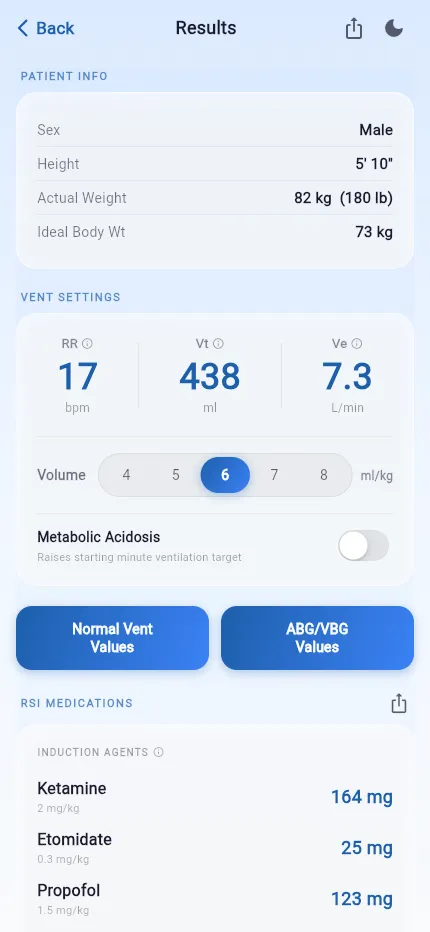
One medical calculator for vent settings, RSI dosing, and respiratory references
Everything lives one tap from the calculator, in light or dark mode, with shareable snapshots for documentation and handoff.
RSI medication dosing by weight
Weight-based dose estimates for induction agents and paralytics, calculated from the same patient entry as your vent settings. One workflow covers the airway and the vent, from induction through post-intubation sedation.
Every dose is an estimate to verify against your protocols, and the app says so on the same screen.
Download it free →Normal vent values and blood gas references
Quick references for normal ventilator values: plateau pressure, PEEP, PIP, EtCO2, I:E ratio, and FiO2. ABG and VBG ranges for reading blood gases during transport or at the bedside, and a RASS chart for sedation scoring after the tube passes.
Get the references free →Dark mode, saved sessions, shareable results
Dark mode keeps the screen readable in the back of a truck at night. Recent sessions resume where you left off, and results export as a clean snapshot for documentation, handoff reports, or teaching.
Try it on your next shift →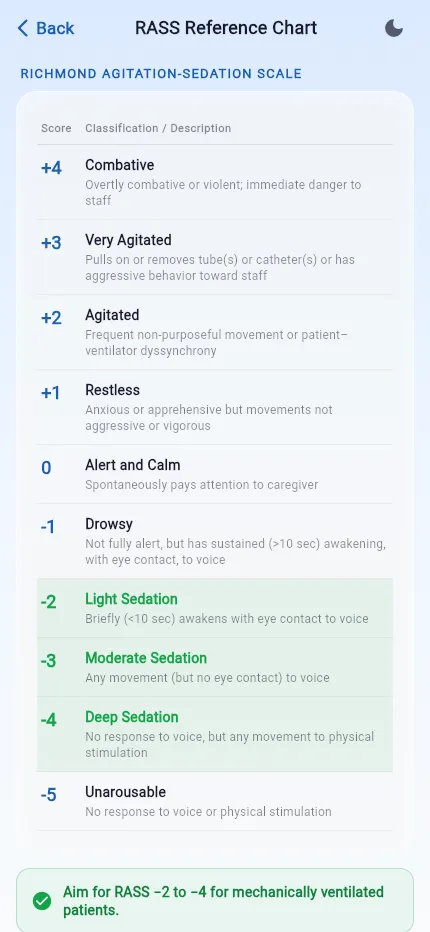
The EMS field guide to mechanical ventilation, in your pocket
EMS and paramedics
Post-intubation vent management on scene and en route, with RSI dosing in the same workflow. Fewer things to remember when the call is already loud.
Flight and transport teams
Verify sending-facility settings against ideal body weight before a long leg, and document with a shareable snapshot at handoff.
Emergency departments
Starting-point settings for the freshly intubated patient while respiratory therapy is still three rooms away.
RTs, nurses, and ICU teams
A fast second check on tidal volume math, plus normal values, blood gas ranges, and RASS references for teaching at the bedside.
Normal vent values
Normal ventilator values: would you get these right at 2 a.m.?
Every ventilated patient rides on a handful of numbers. Tap each card and check yourself.
What cuff pressure protects the trachea?Tap to check
20-30 cm H₂O
Below 20 risks aspiration and air leak. Above 30 risks tracheal mucosal ischemia.
Where does plateau pressure need to stay?Tap to check
<30 cm H₂O
Above that, barotrauma risk climbs. If Pplat is high, drop tidal volume and hunt for the compliance problem.
What SpO₂ do you target in ARDS?Tap to check
88-95%
Lung-protective targets run lower than the 94-98% you aim for in general patients.
Normal EtCO₂ range?Tap to check
35-45 mmHg
High usually means more minute ventilation is needed. Raise the rate, not the tidal volume. In obstructive disease or auto-PEEP, lengthen expiratory time instead of reflexively raising the rate.
The whole reference card lives in the app
No memorizing, no laminated cheat sheets. Rapid Vent keeps the normal ventilator values one tap from your calculated settings, and every parameter expands into troubleshooting guidance. Tap an elevated plateau pressure and get the checklist: reduce tidal volume, assess compliance, consider gastric decompression. Tap a high EtCO₂ and the app reminds you to raise the rate, not the volume, and to favor longer expiratory time over a reflexive rate bump when the patient is obstructive or auto-PEEPing.
FiO₂ guidance is built in too: start high after RSI, titrate down aggressively, and target the SpO₂ range that fits the patient in front of you.
Plateau Pressure
Prevent barotrauma
<30cm H₂O
Cuff Pressure
Prevent aspiration and tracheal injury
20-30cm H₂O
EtCO₂
Normal end-tidal monitoring range
35-45mmHg
PEEP
Starting range, titrate to oxygenation
5-10cm H₂O
Peak Inspiratory Pressure
Limit airway pressure
<35cm H₂O
I:E Ratio
Protect expiratory time
1:2 to 1:4
Plateau pressure and the 88 to 95% ARDS SpO2 target come from the NIH ARDS Network protocol (ARDS Network, NEJM 2000). Cuff pressure follows Jaillette et al., Annals of Intensive Care 2014; EtCO2 follows StatPearls Capnography; the I:E range follows the Merck Manual Professional Edition. PEEP and peak pressure are starting points rather than fixed limits, titrated to the patient. These values mirror the reference screen in the app, and your local protocols govern.
5.0
Rated 5.0 by EMS and critical care clinicians
Every one of the app's 47 App Store ratings is five stars. Here's what the crews using it say.
★★★★★
Vent App
"I have been an EMS Educator for nearly 15 years… There’s always the “guess” method which is both dangerous and foolish. This app makes a lot of that stress disappear! I love it and I’ve recommended this app to everyone."
★★★★★
Clear, concise and easy to use
"Clean layout and easy to use. Easy to use in high stress situations. All the information is at your fingertips after inputting a couple questions about the patient."
★★★★★
Nice App
"Works well, and easy to use. Very quick for field use. Love the drug doses at the bottom. Definitely recommend for all EMS providers!"
Join them, free:
Frequently asked questions
Is Rapid Vent Calculator really free?
Yes. Rapid Vent Calculator is completely free on the Apple App Store and Google Play. No account, no subscription, no paywall on core features.
What is a ventilator settings calculator?
A ventilator settings calculator takes patient information like sex, height, and weight and returns starting-point ventilator settings: tidal volume, respiratory rate, and minute ventilation. Rapid Vent Calculator bases every calculation on ideal body weight and lung-protective ventilation targets, so the numbers you start with are the numbers the evidence supports.
How does Rapid Vent Calculator determine tidal volume?
It calculates ideal body weight from the patient’s sex and height using the Devine formula, then multiplies by your selected mL/kg (typically 6–8 mL/kg for lung-protective ventilation). Height drives the calculation because lung size tracks with height, not body weight.
What is lung-protective ventilation?
Lung-protective ventilation means ventilating with lower tidal volumes, around 6–8 mL/kg of ideal body weight, to avoid overstretching the lungs. The landmark ARDSNet trial found that ventilating at 6 mL/kg instead of 12 mL/kg reduced mortality in ARDS patients. Those principles now guide ventilation for most adult patients.
Who is Rapid Vent Calculator for?
It is built for licensed healthcare professionals who manage adult ventilator patients: paramedics and EMS crews, transport and flight teams, respiratory therapists, emergency department and ICU nurses, and physicians.
Does the app replace my protocols or clinical judgment?
No. Every value the app produces is a starting-point estimate. You still verify against the patient in front of you, your local protocols, and your scope of practice. The app does the arithmetic so you can spend your attention on the patient.
Your next vent patient is already out there
Put the calculator in your pocket before the tones drop. Free on iPhone and Android, no account required.
Free · No account · Rated 5.0 by the clinicians who use it